Choosing a Business Card Vendor for Your Company: 8 Questions to Ask
What to ask a corporate business card vendor before you sign up: online portal, team setup, approvals, billing, where cards are printed, real costs, quality checks and support.
 By Brandly Team
Learn
On this page
When you choose a business card vendor for a company, look past the price per box. Ask whether they give you an online portal with locked templates, how they load your team (spreadsheet, HR sync or single sign-on), what approval and billing options they offer, where they print and how long shipping takes, what you’ll really pay per order, who checks every order, and what support you get. The right vendor turns business cards into a few clicks instead of an ongoing admin job.
For one person, any online printer will do. For a company, business cards are a recurring process: new hires, title changes, office moves, rebrands and someone in each department asking where the latest template is. The vendor you choose decides whether that process takes a few clicks or a few emails per order.
Whether you’re in operations, marketing, HR or procurement, here are the eight questions to ask, and how Brandly answers each one.
What is a business card portal?
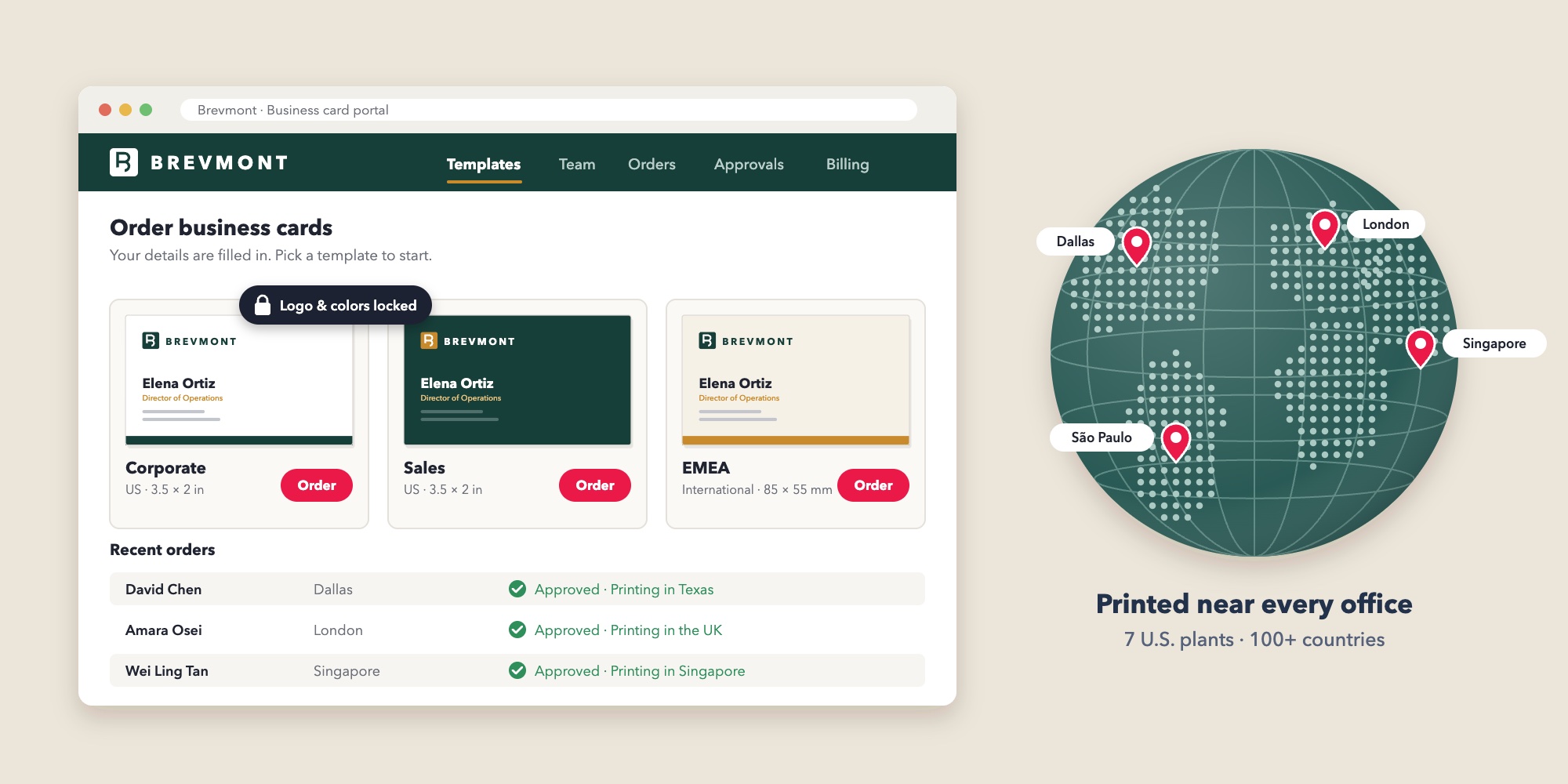
A business card portal is a private website where a company orders its business cards. It stores your approved templates and your employees’ details, so anyone on the team can order an on-brand card in a few clicks, with the approvals and billing your company needs. The design is set once, the logo and layout are locked, and each person fills in only their own name, title and contact details.
Do you need one?
A portal pays off if any of these sound familiar:
- Someone spends hours chasing names, titles and proofs every time cards are ordered.
- You have more than a handful of people who need cards, or you’re hiring quickly.
- You have several offices, divisions or brands, each with its own design.
- Cards don’t match. Different teams use different versions of the template.
- You’re rebranding, and everyone needs new cards at once.
- You don’t have a designer on hand to update cards for each new hire.
A very small team that orders once a year can get by without one, but with a free portal there’s little reason not to.
Three kinds of business card vendor
| Local print shop | Consumer online printer | Business card portal | |
|---|---|---|---|
| Ordering | Email or phone, one order at a time | Each person designs and orders on their own | Employees or admins order from locked company templates |
| Brand control | Depends on who sends the file | Little. Anyone can change the design | Logo, colors and layout locked |
| Employee details | Typed into emails | Typed in each time | Pre-filled from a profile |
| Approvals | Manual | None | Built in |
| Billing | Per-job invoices | Personal credit cards and expense reports | Company card, invoicing or procurement system |
| Multiple offices | Shipped from one shop | Shipped from one plant | Printed near each delivery address |
For most companies with more than a handful of people, a portal is the better fit. The questions below help you compare portals, and check whether a vendor’s portal does what it says.
1. Do you give us a private online portal?
A business card portal is a private website for your company’s cards. Ask what’s in it and what it costs. With Brandly:
- Your design becomes a template. Upload a PDF of your card and it becomes an online template. The name, title and contact details become fields, and the logo, colors and layout are locked.
- Templates for each division or brand. Keep as many as you need, and use groups to show each employee only the templates that apply to them.
- Admin or self-ordering. An admin can order for anyone, or employees can order their own cards from an invite.
- Free. The portal is free, with unlimited team members and templates, and setup help is included. You pay only for cards.
Some vendors charge a monthly fee to “maintain” a portal or a setup fee for each template. Ask before you sign up.
2. How do we get our team into it?
A portal is only fast if it already knows who your employees are. Ask how team members are added and kept up to date. Brandly offers:
| Method | How it works |
|---|---|
| Spreadsheet import | Upload names, titles, phone numbers and emails from Excel or Google Sheets. Or send the spreadsheet to Brandly, and we’ll format and upload it free. |
| Gusto sync | Connect Gusto and sync team members with one click. Brandly is in the Gusto App Directory. |
| Single sign-on | Employees sign in with their company account through SAML SSO, with Okta, Microsoft Entra ID, Google Workspace, JumpCloud and other identity providers. Your SSO can pass each person’s name, title and phone number. |
| Invites | Send each employee a personal invite by email, or share one link with the team. |
Each employee gets a profile with their contact details, title and photo. Their card starts pre-filled from that profile, so there’s less typing and fewer typos. With the right permissions, employees can update their own profile.
3. How do we keep orders on-brand and under control?
Self-ordering saves time only if you trust what gets ordered. Ask what controls the vendor gives admins. Brandly’s include:
Approval workflows
- Three modes: no approval, admin review before printing, or admin review plus payment.
- Choose who approves: all admins, an admin the orderer picks at checkout, or the admins in the orderer’s group, such as their office or department.
- Reminders to approvers after a set number of days.
- Auto-approve orders nobody has reviewed after a set number of days, so a busy approver doesn’t hold up a new hire’s cards.
- Request changes. If a card needs something the template can’t do, the orderer can choose “I need changes” in the cart and describe it. Our team makes the change, and the order waits until the orderer approves it.
Locked options
- Locked fields that employees can’t change, such as the company address or a pre-filled title.
- Locked paper and quantity, so everyone orders the same thing.
- Current templates only. Reorders can be limited to active templates, so nobody reorders an old design after a rebrand.
- Stop an order before it goes to production.
4. How can we pay?
Billing is where many vendors fall short for companies. Personal credit cards and expense reports work for one person, not for 200. Ask which of these the vendor supports. Brandly offers:
- A saved team card used for every order.
- Payment at checkout, with a personal or team card. This is useful for franchises, where each location pays for its own cards.
- Admin payment during review, so employees never handle payment.
- Invoicing, monthly or semi-monthly, included in the Business Plus plan. Admins can view, download and pay invoices from the Billing tab.
- Credit cards, ACH and checks.
- Procurement systems. If your company buys through Coupa or SAP Ariba, employees can order through punchout, and invoices are sent straight into Coupa, matched to the purchase order.
Every order also has an emailed receipt you can download later.
5. Where do you print, and how fast do cards arrive?
Ask where the vendor actually prints. A vendor with one plant ships every order across the country, which adds days and cost. Brandly prints each order at the facility closest to where it’s going:
| Brandly | |
|---|---|
| U.S. print facilities | Seven, in Arizona, California, Florida, Minnesota, New Jersey, Ohio and Texas |
| U.S. shipping | Most of the country is within one day of ground shipping from a Brandly facility |
| International | Printed locally in more than 100 countries, through over 300 print facilities |
| Production | Most orders go into production within 24 hours and are ready to ship in 2 to 3 days |
| Delivery | Most orders arrive in 7 to 10 business days, in the U.S. and abroad |
| Shipping cost | Free standard shipping in the lower 48 states |
Printing locally abroad means international offices pay local rates, with no cross-border shipping or customs fees. Brandly also supports non-Latin characters, such as Japanese, Chinese and Korean, and prints both U.S. (3.5 x 2 in) and international (85 x 55 mm) sizes.
Need cards sooner? Admins can turn on expedited shipping for everyone or only for admins. Orderers then choose a rush option or the date they need cards by at checkout.
6. What will we really pay?
Watch for prices that look low until checkout. Common add-ons are printing the back, shipping, setup fees and portal fees. Ask for the total for a typical order, delivered.
With Brandly:
| Included? | |
|---|---|
| Portal and unlimited users | Free |
| Template setup | Free |
| Printing the back | Free |
| Standard U.S. shipping | Free |
| Business Plus (SSO, invoicing, vCard+) | Optional, $99 a year per team |
Cards start at $29.99 for 100 on Standard matte paper, and 1,000 cost $78.99, about 8¢ each. See all paper prices. For a large team, non-profit, government or education pricing, or special billing requirements, ask for a custom quote.
7. Who checks our orders, and what if something’s wrong?
Self-ordering means more people placing orders, so mistakes happen. Ask whether anyone looks at an order before it’s printed, and what happens if something goes wrong.
At Brandly:
- Every order is checked by a person for typos and print problems before it goes to press. We contact you if anything looks wrong.
- Satisfaction guarantee. If you find a printing defect within 21 days of delivery, send us a photo, and we’ll reprint the order for free. If a reprint doesn’t fix it, we refund all or part of the cost.
- Lost or damaged packages are reprinted and reshipped.
- Emergencies. If someone needs cards for a trade show tomorrow, we can arrange a local print shop to bridge the gap.
- Order history. Admins can find any past order by name, email, address or order number and reorder it.
8. What support do we get?
You’ll need help with setup, and occasionally with an order. Ask who you’ll talk to and how fast they respond.
Brandly support is by email at [email protected] and live chat in the app, 9 am to 8 pm Eastern. Our team sets up templates and imports team spreadsheets for you, and the Support Center covers ordering, artwork, shipping and billing. See what customers say on Trustpilot and Capterra.
- Portal: private, with locked templates, and free?
- Team setup: spreadsheet import, HR sync, single sign-on, invites?
- Controls: approvals, locked fields, paper and quantity?
- Billing: company card, invoicing, ACH, procurement systems?
- Printing: how many plants, how close to your offices, and international?
- Cost: total per order, including the back, shipping and setup?
- Quality: human checks and a reprint guarantee?
- Support: setup help, email and chat, and real reviews?
Business card vendor FAQs
What is a business card portal?
A private website where your company orders business cards. It stores your approved templates and your employees’ details, so anyone can order an on-brand card in a few clicks, with approvals and billing set up the way your company needs.
Do I have to pay for a business card portal?
Not with Brandly. The portal is free, with unlimited team members and templates, and setup help is included. You pay only for the cards you order. An optional Business Plus plan, $99 a year per team, adds single sign-on, monthly or semi-monthly invoicing and vCard+.
Can we pay by invoice instead of credit card?
Yes. With Business Plus, Brandly invoices monthly or semi-monthly, and you can view, download and pay invoices from your account. Brandly accepts credit cards, ACH and checks. If you buy through Coupa or SAP Ariba, you can order through punchout.
Where are the cards printed?
In the U.S., at seven print facilities, in Arizona, California, Florida, Minnesota, New Jersey, Ohio and Texas. Each order is printed at the facility closest to where it’s going. Outside the U.S., Brandly prints locally in more than 100 countries through a network of over 300 print facilities.
How long does delivery take?
Most orders go into production within 24 hours and are ready to ship in 2 to 3 days. Most U.S. orders arrive within 7 to 10 business days, and most international locations within 7 to 10 days. Expedited shipping is available if your admin turns it on.
What if there's a mistake on our cards?
A Brandly team member checks every order for typos and print problems before it’s printed. If you find a printing defect within 21 days of delivery, send a photo and Brandly will reprint the order for free. Lost or damaged packages are reprinted and reshipped.
The takeaway
For a company, the best business card vendor isn’t the one with the cheapest box of 100. It’s the one that makes ordering easy for everyone and keeps every card on-brand. Look for a free private portal with locked templates, easy ways to load your team, real approval and billing options, printing close to your offices, all-in pricing, a person checking every order and responsive support.
To see how ordering works from sign-up to delivery, see how to order business cards online for your team.
Set Up Your Free Business Card Portal
Get Started