What to Put on a Business Card: The Essentials, the Extras and What to Leave Off
What to put on a business card: the essentials every card needs, extras by role (license numbers, credentials, QR codes, photos), what to leave off, and what goes on the front vs the back.
 By Brandly Team
Inspiration
On this page
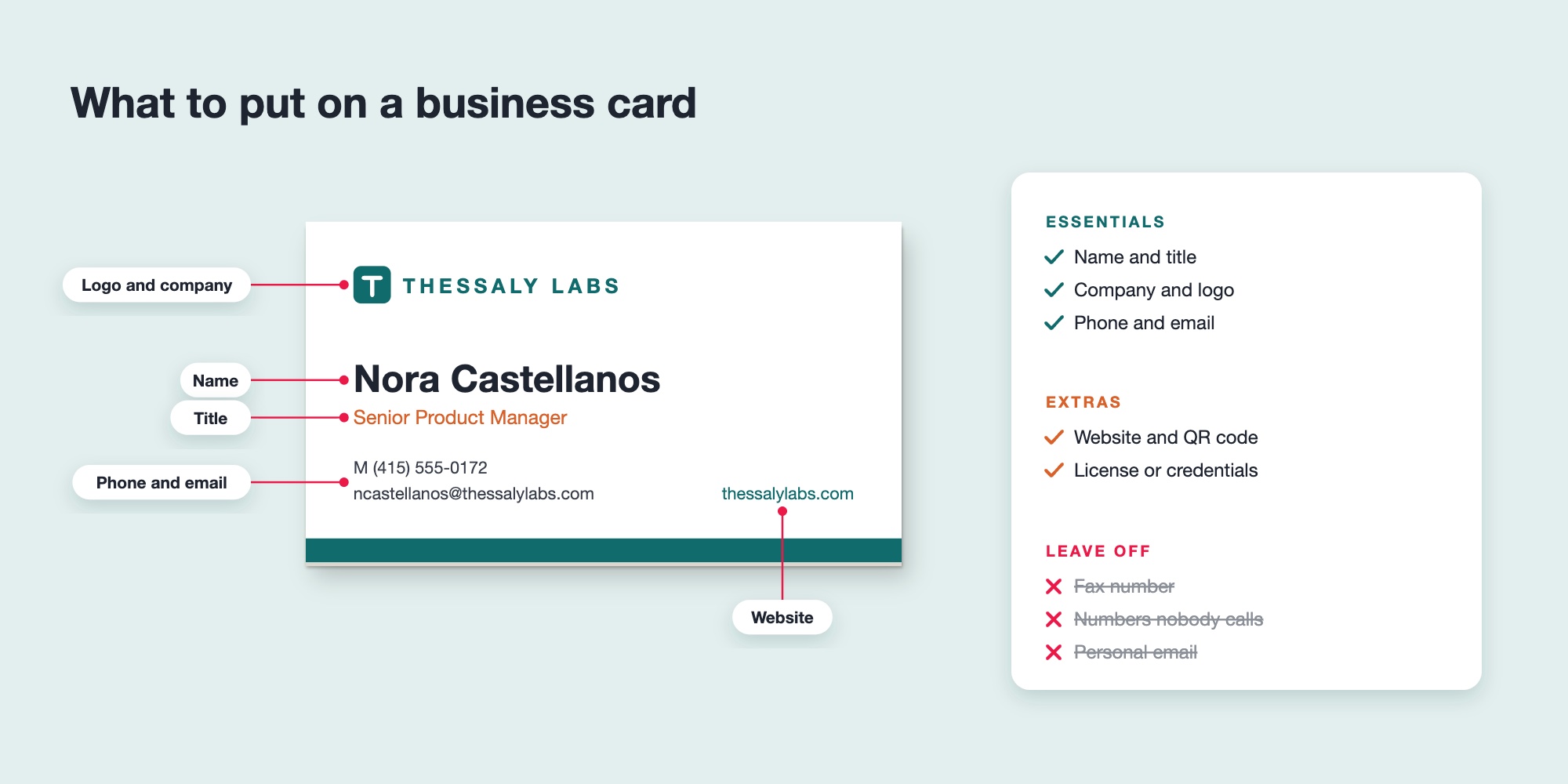
A business card should include your name, job title, company name and logo, and the one or two ways people actually contact you, usually a phone number and email. Useful extras are a website, a QR code that saves your details to a phone, and, depending on your role, a license number, credentials or a headshot. Leave off anything nobody uses, such as a fax number or a second phone line, and put extras on the back.
A business card has one job: help someone remember who you are and get in touch. Everything on it should do that job. This guide covers what to include, what’s worth adding for your role, what to leave off and how to split it between the front and the back.
The essentials
Front: the essentials
Who you are, who you work for and how to reach you.
Back: the extras
A QR code, your services or a notes space, all printed at no extra cost.
| Element | Why it matters | Tip |
|---|---|---|
| Name | The first thing people read and remember | Use the name you go by. Add a preferred name if it’s different, such as Katherine “Kate” Morales. |
| Job title | Tells people what you do and why to call you | Use a title people outside the company understand. |
| Company name and logo | Connects you to your company and its brand | A modest logo with space around it looks more confident than a big one. |
| Phone number | The fastest way to reach you | List the number you answer, usually your mobile. |
| Email address | How most follow-ups happen | Use your work email, not a personal one. |
That’s enough for a complete card. Everything else is optional and should earn its space.
Useful extras
| Extra | Include it if… |
|---|---|
| Website | It has something useful for the person you meet, such as your services or listings. |
| QR code | You want people to save your details in one scan. A contact page like Brandly’s vCard+ works best. See QR code business cards. |
| Office address | People visit you or send you things. |
| Second phone number | People really use both. Label them, such as O and M. |
| Social media | One or two accounts you keep current. See social media icons on business cards and Instagram on business cards. |
| Headshot | People are choosing you, not just your company. See photo business cards. |
| Tagline | It says what you do in a few words. |
| Pronouns | You or your company include them in email signatures too. |
What to include by role
| Role | Add |
|---|---|
| Real estate agents | License number where required, brokerage name, headshot, REALTOR® mark for NAR members. See real estate business cards. |
| Insurance and financial advisors | License numbers and regulatory disclosures your firm requires, designations like CFP or CLU. |
| Lawyers and accountants | Credentials such as Esq. or CPA, office address. |
| Engineers and architects | Licenses and certifications such as PE or AIA. |
| Healthcare | Credentials, practice address, appointment phone number. |
| Sales and account managers | Mobile number and a QR code to save your contact or book a meeting. |
| Contractors and field service | License number, service area, website for quotes. |
What to leave off
- A fax number, unless your industry still uses fax.
- Numbers nobody calls, such as a main switchboard nobody answers.
- Personal email addresses, on a company card.
- Every social network you have. Pick the one or two that matter.
- Long taglines, mission statements and lists of services on the front. Move them to the back, or leave them out.
- Anything out of date. If your title, phone or office changes, order new cards rather than crossing things out.
Front or back?
| Front | Back |
|---|---|
| Name and title | QR code |
| Company name and logo | Services, in three to five short lines |
| Phone and email | Logo on a brand color |
| Website | Appointment or notes space, on a writable paper |
| A translated side for international clients |
Brandly prints the back at no extra cost, so use it. For the layout itself, such as order, sizes and white space, see how to design a business card.
For a team: decide once
When a whole company orders cards, decide what goes on them once, in a template:
- Lock the logo, company name, website and layout.
- Leave editable the personal details: name, title, phone and email.
- Add optional lines for things some people need and others don’t, such as a second phone number, a license number or credentials.
With Brandly, each employee’s details fill in from their profile, so every card follows the same rules. See business cards for employees.
- Always: name, title, company and logo, phone, email.
- Often: website and a QR code.
- By role: license number, credentials, headshot, address.
- Leave off: fax, unused numbers, personal email, extra social accounts.
- Use the back for a QR code, services or a notes space.
Business card content FAQs
What should be on a business card?
Your name, job title, company name and logo, and the one or two ways people actually reach you, usually a phone number and email. A website is a useful extra, and many cards now add a QR code that saves your contact details to a phone.
Should I put my address on my business card?
Only if people visit you or send you things, such as a law office, clinic, showroom or shop. For remote workers and most sales roles, leave it off and use the space for something more useful.
Should I put both an office and a mobile number?
Only if people use both. If clients call your mobile, list just that. If you include both, label them, for example O for office and M for mobile.
Do I need to put my license number on my business card?
In some industries and states, yes. Real estate agents, insurance agents, contractors and some financial professionals often must include a license number on advertising, including business cards. Check your state’s rules.
Should I put social media on my business card?
Only the one or two accounts that matter for your work and that you keep current, such as LinkedIn for most professionals or Instagram for creative and retail roles.
What goes on the back of a business card?
Something useful that doesn’t fit on the front: a QR code, your services, a tagline, an appointment space, a translated side for international clients, or simply your logo on a brand color.
The takeaway
Put the essentials on every card: your name, title, company and logo, phone and email. Add a website, a QR code or role-specific details only when they help the person you’re meeting, leave off anything nobody uses, and move extras to the back. Then design it so the most important line is the easiest to find.
Set Up Your Free Business Card Portal
Get Started